
Free city builder · plays in your browser
Citybrush One brush. A whole city.
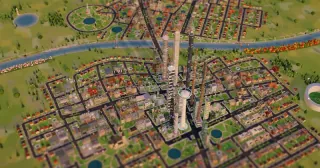
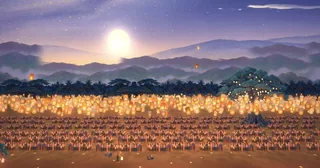
A city-building game with one magic brush. Drag across the land and a neighbourhood lays itself out: streets, homes, shops, schools, parks and power. Paint over it again and it grows taller, until the towers merge. Build in nine ages, from Ur in 2100 BC to the year 3026, then drive through what you made.
Built with AI. No AI inside.

Laying out the land…
This is taking longer than expected.
How to play
You paint the idea.
The city works out the rest.
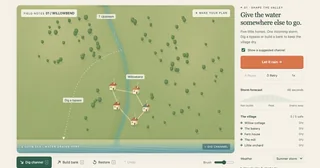
You never pick a house or a road. The magic brush reads the land and the area you paint, then lays out a neighbourhood that fits it: a grid, an old town, a garden suburb, rings round a plaza or a crescent round a bay. On hills it builds terraces and stairways; by the water, quays and promenades.
Every building is placed by rules written into the app and run in your browser. Nothing is generated by a model while you play, and nothing you paint leaves your computer.
Your city saves itself in this browser as you go. Save it as a file or a picture any time with the buttons at the top right. On a phone it works, but a computer with a mouse or touchpad is much better.
- 01Drag on the mapA whole neighbourhood appears: streets, homes, shops, a clinic, parks and power.
- 02Paint over it againTownhouses become towers. Paint more and whole blocks merge into superstructures.
- 03Press EraBuild the same strokes in nine ages: Ur, Egypt, a medieval town, Imperial China, Edo Japan, Mughal India, the 1880s, today and 3026.
- 04Press Drive or FlyRide through your streets in a cart, a chariot, a little car or a hover pod, or fly a robot, a dragon or a UFO.
- 05Press EvolveWatch it carry on by itself, a decade at a time, into the future.
- 06Change the land and the lookTwelve landscapes, six looks from Clay to Cyberpunk, and a time-of-day slider with lit windows at night.
Keep it
Want Citybrush on your own computer?
Patreon members can download it: one file you double-click to open in your browser, on a Mac or Windows.
Questions
Before you start painting
Is Citybrush free?
Yes. You can play it free here in your browser, with no account and no sign-up. Patreon members can also download it to keep on their own computer.
Do I need to install anything?
No. It runs in your web browser. The first time, it loads its 3D engine from the internet, which can take a moment on a slow connection. It runs best in a recent Chrome or Edge on a computer, and it needs WebGL 2, which most computers from the last few years have.
Does it save my city?
Yes. Your city saves itself in this browser as you go and is there the next time you open this page. Clearing your browser's site data removes it, so use the save button at the top right to keep a copy as a file, or the camera button to save a picture.
What can I build?
Whole neighbourhoods: streets, homes, shops, schools, clinics, parks and power. Build in nine ages, from Ur in 2100 BC through Egypt, a medieval town, Imperial China, Edo Japan, Mughal India and the 1880s to today and the year 3026. Pick from twelve landscapes and six looks, then drive or fly through your city.
Can I play it on a phone?
It opens on phones and tablets, but it is made for a mouse or touchpad. On a small screen the controls are crowded, so a computer is much better.
Is there AI inside Citybrush?
No. Citybrush was built by describing it to AI and shaping the result, round after round, but the game has no AI in it. Every building is placed by rules written into the app and run in your browser, and nothing you paint leaves your computer.
From playing to making
What would you build?
Citybrush was made by describing it to AI and shaping the result, round after round. That is the skill these teach.
Make your ideas tangible. ↗
Video lessons and worked examples for building with AI, from an ongoing practice.
Explore the lessons ↗ 1000x LabStay close to the practice. ↗
Join the live Sunday Lab to explore current tools, experiments and your questions.
See the live Lab ↗ Private consultingWork on what matters. ↗
Clarify your direction, see the larger system and find the work worth amplifying with AI.
Explore consulting ↗